

Apple SUP-2026 Questions and Answers Guarantee you Oass the Test Easily
Share Latest SUP-2026 DUMP with 306 Questions and Answers
NEW QUESTION # 152
How can you get detailed information about a Mac computer's Wi-Fi environment?
- A. A Network Utility summary
- B. An Activity Monitor network screenshot
- C. A Wireless Diagnostics report
- D. A Console wireless report
Answer: C
Explanation:
Wireless Diagnostics on Mac is used to analyze the Wi-Fi environment and create a detailed diagnostic report, including wireless configuration, logs, and nearby Wi-Fi network information.
Network Utility, Console, and Activity Monitor don't provide the same dedicated Wi-Fi diagnostic report.
NEW QUESTION # 153
Which Wi-Fi authentication settings does Apple recommend for better security for Wi-Fi routers and access points?
- A. WPA3 Personal or WPA2/WPA3 Transitional
- B. WPA3 Personal or WPA Personal
- C. WPA2/WPA3 Transitional or WEP Transitional Security Network
- D. WPA3 Personal or WPA/WPA2
Answer: A
NEW QUESTION # 154
You plan to erase and reinstall macOS. You want to preserve the Mac computer's network settings, which aren't backed up. What should you do before you start to erase?
- A. Restore macOS and choose "Preserve all data."
- B. Record your network settings and back up files.
- C. Use macOS Setup Assistant to recover settings.
- D. Use Startup Disk to export a settings profile.
Answer: B
Explanation:
Apple states that when you erase and reinstall macOS, user accounts, files, folders, and network settings are deleted. Before erasing, you should back up files and write down your network settings so you can reconnect after reinstalling macOS.
Reference:
https://support.apple.com/guide/mac-help/macos-recovery-a-mac-apple-silicon-mchl82829c17/mac
NEW QUESTION # 155
When developers submit Mac apps for distribution outside the App Store, Apple ________.
- A. Automatically adds a revocation ticket to every new app
- B. Scans the software for known malware and issues a notarization ticket
- C. Requires the app to be distributed only through the Mac App Store
- D. Requires developers to include privacy manifests before review
Answer: B
Explanation:
For Mac apps distributed outside the App Store, Apple's notarization service scans Developer ID- signed software for malicious content and security issues. If it passes, Apple assigns a notarization ticket that Gatekeeper can use to verify the app
NEW QUESTION # 156
A user reports that their USB storage device isn't appearing in the Finder. The storage device also isn't appearing in Disk Utility. Where can you verify that the storage device is connected?
- A. System Information > Hardware > Volumes
- B. System Settings > General > Device Management
- C. System Settings > General > Storage
- D. System Information > Hardware > USB
Answer: D
NEW QUESTION # 157
Which of these methods to restore iPhone reinstalls the latest version of iOS?
- A. Recovery Assistant
- B. Restore using the Finder on Mac
- C. Erase All Content and Settings
- D. Erase Device using Find My
Answer: B
Explanation:
Using Finder on Mac to restore an iPhone erases the device and reinstalls the latest version of iOS. Erase All Content and Settings and Find My erase remove user data/settings, but they don't reinstall iOS.
NEW QUESTION # 158
How do you start your MacBook Pro in macOS Recovery?
- A. Press the power button, then immediately press and hold Command-R.
- B. Hold down the Power-Shift-Control-Option keys, then choose macOS Recovery.
- C. Press and hold Command-Option-R until "Loading startup options" appears. Enter an administratorpassword, then click the macOS Recovery icon.
- D. Press and hold the power button until "Loading startup options" appears, click Options, then click Continue.
Answer: D
NEW QUESTION # 159
Hotspot Question
Select the setting in the sidebar that you should use to turn on FileVault.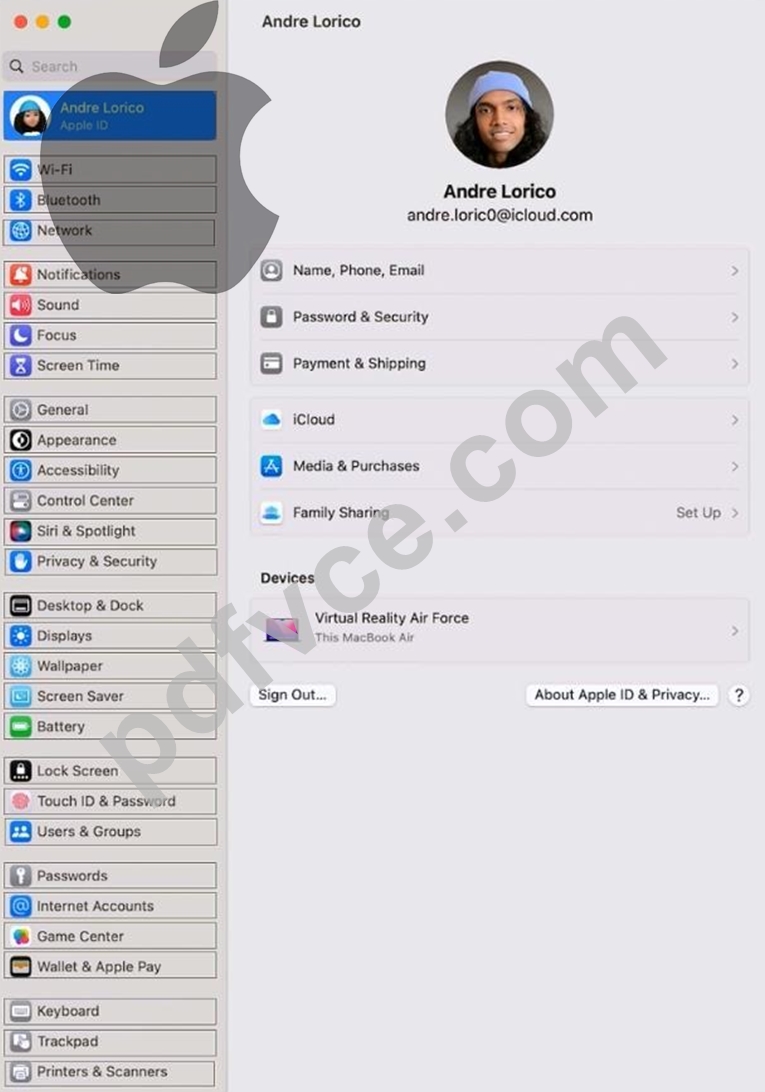
Answer:
Explanation:
On your Mac, choose Apple menu > System Settings, click Privacy & Security in the sidebar, then click FileVault on the right. (You may need to scroll down.) Click Turn On.
You might be asked to enter your password.
NEW QUESTION # 160
Where can you check the real-time service status of Apple network services?
- A. developer.apple.com/system-status
- B. apple.com/support/systemstatus
- C. library
- D. apple configurator for mac
Answer: B
NEW QUESTION # 161
Which accessibility feature enlarges text on the screen when you move the pointer over it?
- A. Pointer Control
- B. VoiceOver
- C. Zoom
- D. Hover Text
Answer: D
NEW QUESTION # 162
Which of these is a Continuity feature?
- A. Siri
- B. iCloud Keychain
- C. Universal Clipboard
- D. Notifications
Answer: C
NEW QUESTION # 163
What might be a risk when you use Force Quit in Activity Monitor?
- A. Force Quit might erase cache files and reset user preferences.
- B. The process might reinstall itself with outdated settings.
- C. You might lose data, and other apps could experience problems.
- D. A process can run again only after you restart your Mac.
Answer: C
Explanation:
Force Quit immediately stops a process. If the app or process has unsaved work or is supporting other running apps/services, data may be lost and related apps may behave unexpectedly.
NEW QUESTION # 164
Which feature requires apps to ask permission before they collect data about your activity across other apps and websites?
- A. Sensitive Content Warning
- B. App Tracking Transparency
- C. Private Browsing
- D. Safety Check
Answer: B
NEW QUESTION # 165
Select 4.
Which iPad models is the Apple Pencil (2nd gen) compatible with?
- A. iPad Air (3rd gen)
- B. iPad Air (4th gen)
- C. iPad (9th gen)
- D. iPad Pro 12.9 inch (3rd gen)
- E. iPad mini (6th gen)
- F. iPad Pro 11-inch (1st gen)
Answer: B,D,E,F
NEW QUESTION # 166
Scenario
Antonio recently bought his iPhone 14 Pro Max. It's taking over an hour to charge the device to
50% using his 5W USB power adapter that came with his previous iPhone.
Why can't Antonio fast charge his iPhone?
- A. Fast charging requires a 61W or higher power adapter.
- B. Fast charging iPhone 14 Pro Max to 50% takes more than 60 minutes.
- C. Fast charging isn't supported on iPhone 14 Pro Max.
- D. Fast charging requires a 20W or higher power adapter.
Answer: D
NEW QUESTION # 167
Which of the following IP address suggests there may be a problem with DHCP?
- A. 192.168.6.75
- B. 169.254.194.49
- C. 10.31.209.58
- D. 172.25.143.2
Answer: B
NEW QUESTION # 168
Guillermo is a designer for ACME, Inc. He uses his 12.9-inch iPad Pro to create marketing materials and do color grading. Which iPadOS feature should Guillermo use to allow his 12.9-inch iPad Pro to accurately display colors for common color standards?
- A. Display Zoom
- B. Reference Mode
- C. True Tone
- D. ColorSync
Answer: B
NEW QUESTION # 169
Which two data types can be included only when you create an encrypted iPhone backup to a Mac? (Select two.)
- A. Wallet
- B. Health data
- C. Face ID
- D. Device passcode
- E. Saved passwords
Answer: B,E
NEW QUESTION # 170
Where can you save a recovery diagnostics file? (Choose the best answer.)
- A. /var/root/Documents
- B. External storage
- C. Macintosh Data
- D. /Users/Shared
Answer: B
Explanation:
Apple states that a recovery diagnostics file created in macOS Recovery should be saved to an external storage device. The internal volumes or system folders are not the intended save location.
NEW QUESTION # 171
How do you start up into fallback recoveryOS on a Mac with Apple silicon?
- A. From a shutdown state, press and release the power button.
- B. Start up in recoveryOS, then hold Shift while selecting the startup volume.
- C. From a shutdown state, double-press and hold the power button.
- D. From a shutdown state, press and hold the power button.
Answer: C
NEW QUESTION # 172
Which four storage formats can the Files app read and write to on iPhone and iPad devices?
- A. APFS
- B. MS-DOS (FAT)
- C. NTFS
- D. ExFAT
- E. Mac OS Extended (HFS+)
- F. ZFS
Answer: A,B,D,E
NEW QUESTION # 173
......
Dumps for Free SUP-2026 Practice Exam Questions: https://www.pdfvce.com/Apple/SUP-2026-exam-pdf-dumps.html
PDF Dumps 2026 Exam Questions with Practice Test: https://drive.google.com/open?id=1QFqIT0TmLImn1Ssu5Fd8m2s3WMOLAgor